Software · Data & FinOps
Know exactly what each Azure data product costs
Showback reports per data product — reconciled to your Azure invoice. Storage, Databricks, ADF, and Synapse in one view.
- Storage, Databricks, ADF, Synapse
- Hotspots · Drill-down · Reconciliation
- Deployment in your Azure tenant
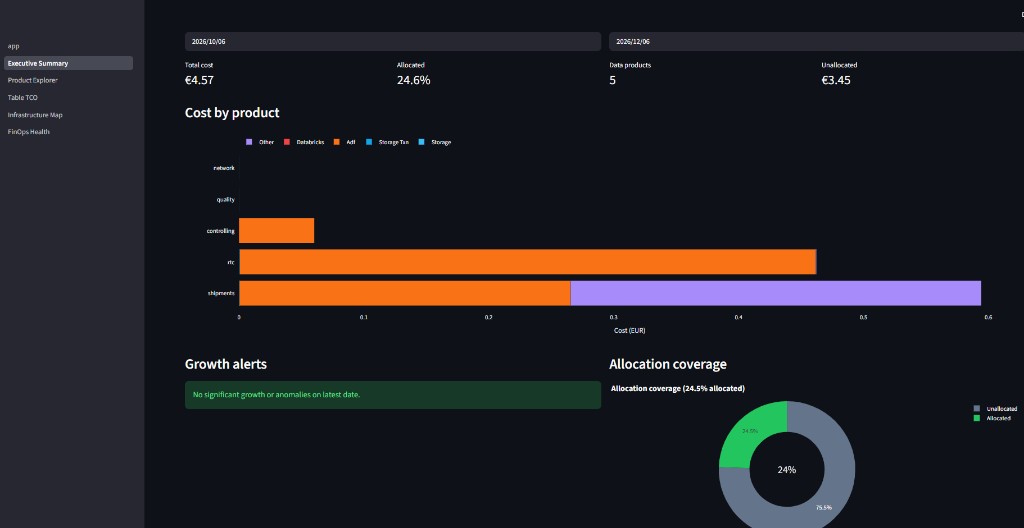
DataFinOps · Live dashboard
The problem
Where is your Azure bill hiding?
Azure environments grow — cost transparency often doesn't keep up.
Which dataset drives the costs?
Storage, Databricks, ADF, and Synapse run in parallel — but Cost Management alone doesn't show which table or dataset is responsible.
Which pipeline causes execution costs?
Jobs and pipelines create hidden costs. Without per-workload allocation, there's no basis for optimization.
Do showback and invoice match?
Allocated costs must reconcile with the Azure invoice — otherwise there's no trust in the numbers.
Which data product consumes the most?
Enterprise teams need cost transparency per data product — not just at subscription level.
Features
Everything FinOps and data platform teams need for transparent Azure costs.
Storage costs per folder/prefix
Blob Inventory and diagnostic logs for precise storage showback.
Read and write transaction costs
Transaction costs allocated by folder and data product.
Databricks job and cluster costs
System tables for job, cluster, and SQL warehouse costs.
ADF and Synapse pipeline costs
Pipeline and activity run costs per data product.
Cost allocation per data product
Allocation Engine distributes costs by your product logic.
Reconciliation with Azure invoice
Reconciliation — allocated + unallocated = invoice total.
Product preview
In the dashboard
Real dashboard views — no stock photos.
Cost hotspots and day-over-day growth
Architecture
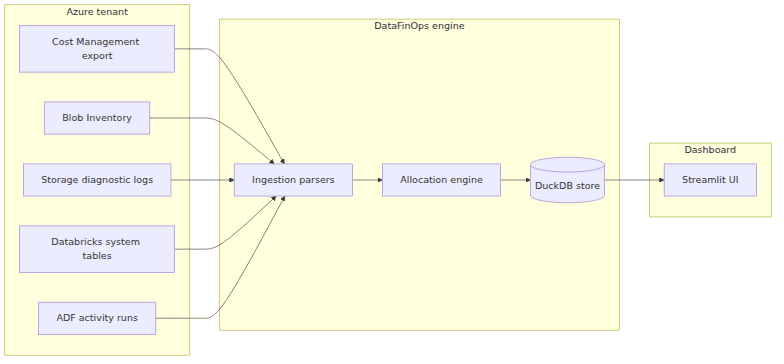
Azure Cost Management, Blob Inventory, diagnostic logs, and Databricks tables → Allocation Engine → Dashboard. Data stays in your tenant.
Azure Tenant
Cost Mgmt · Blob · Logs · Databricks · ADF
Ingestion
Parser & normalization
Allocation Engine
Showback per data product
DuckDB Store
Local analysis
Dashboard
Streamlit UI
Connect Azure cost feeds
Cost Management Export, Blob Inventory, diagnostic logs, and Databricks tables — read-only in your tenant.
Map data products and folders
Allocation Engine maps costs to your data products, folders, and workloads.
View showback and reconcile
Dashboard with hotspots, drill-down, and reconciliation against the Azure invoice.
Ready to explore our products?
Software, education, marketing, or gaming — talk to us about your use case or book a demo.